Monday, April 15, 2019

Reflection Blogs-Autism and the iPad

Hi again! I will be posting a series of reflection blogs for my 21st Century Teaching and Learning class. All of the presentations done by my classmates were amazing! However, I will only be sharing a few.

The first presentation I want to reflect on is called "iPads and Autism." It has been proven that iPads are an extremely helpful and calming tool to use with individuals who have autism, especially in the classroom setting, where it can sometimes be stressful for these individuals. iPads are portable, use a direct touchscreen, are a digital parallel to books, organized and predictable, help break learning down, and encourage independent learning. Amidst all of these wonderful benefits, iPads are also wonderful communication tools, whether you use them to share social stories (autistic students sometimes struggle with social concepts. A simple social story could be, "Learning how to be kind to others.") or whether you use them to help students who are non-verbal to have a full-on conversation with you. 
iPads have apps that allow non-verbal children to press a button to make a request, communicate developmentally appropriate words and phrases, and even learn how to get used to a routine during the school day. Autistic students need structure at the core of learning, and iPads easily provide that for them. Some apps that you can use to aid your autistic students are Brain Parade and Floreo. Both of these apps have the communication techniques in their programming as described, and are very dedicated to progress among the autistic community. As you can see, iPads are becoming a necessary tool for people with autism or other disabilities. This technology allows students to achieve much more than what they are being limited to with their disability. 

How will this help me as a teacher? What have I learned? How has this changed my thinking?
I will tell you, I used to hate the idea of using technology in the classroom. I am very old school, and I used to believe that it was a hindrance to have to include technology in my lessons. However, now that I have seen how much it can help our students and allow them to grow and learn and even flourish, my mind is changed completely. I plan to use technology in my classroom now, not as a crutch, but as an integral part of learning. I plan to allow students to choose whether or not they want to use technology to complete assignments, and to explore other types of tech that can be helpful to my students with disabilities. I can't wait to see what the future holds!

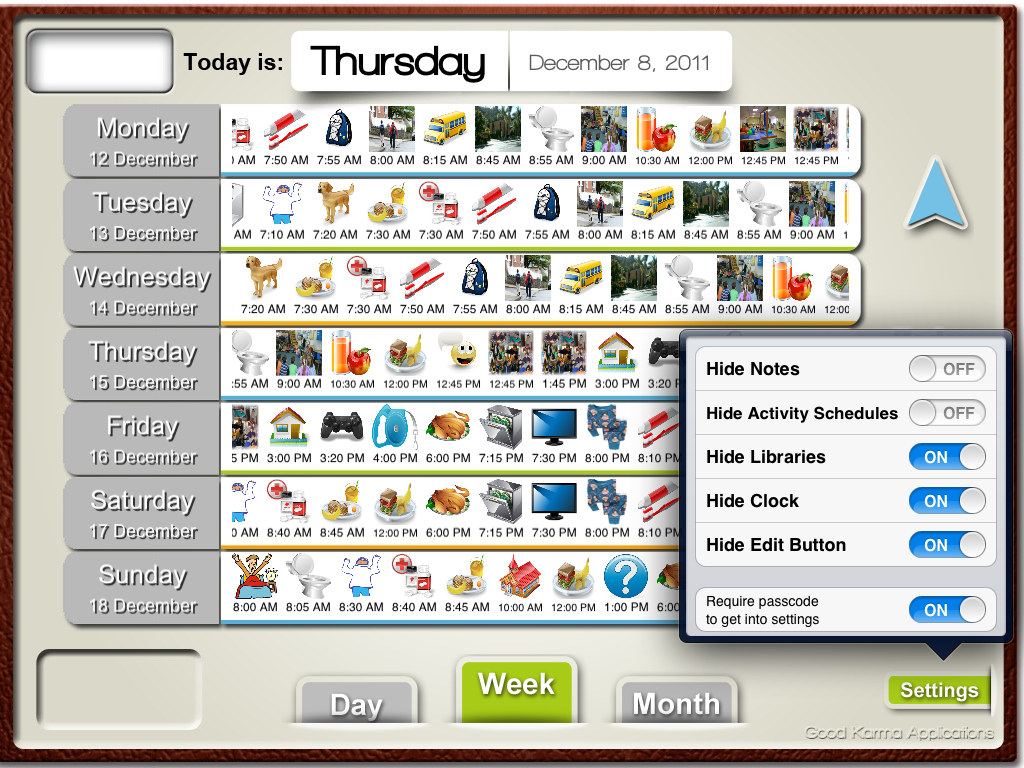
The following two pictures are examples of what apps for autistic students look like on an iPad. The first picture is of simple commands that can be used by non-verbal students. They press a button, and the command is voiced through the speakers of the iPad. The second picture is an example of a visual schedule for an autistic student. This visual schedule provides structure for the student and helps them not be anxious when a classroom change is happening. 
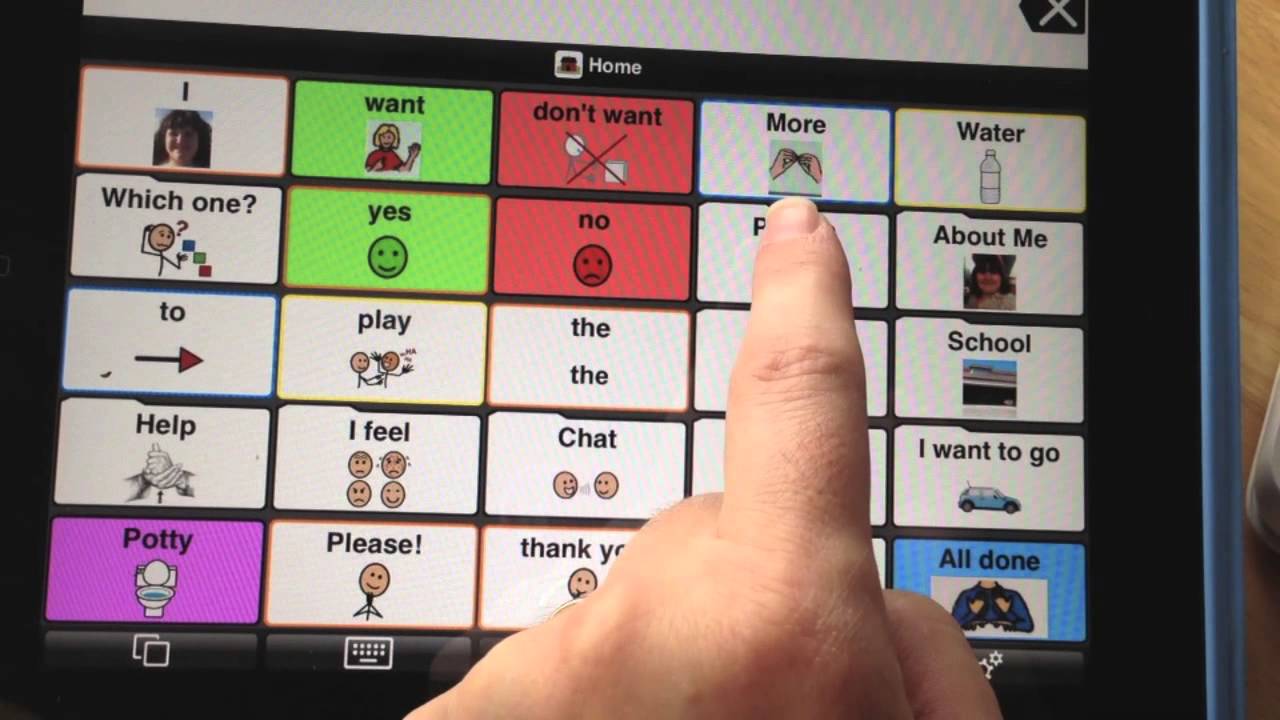


Image result for autism and the ipad

Image result for autism and the ipad school routine

This video showcases how important iPads are for autistic students. It gives great insight to the struggles that these students face daily, and how the iPad can help. 

Sunday, January 27, 2019

iPads for Teaching and Learning

Here is a link to my newsletter on SMORE about using iPads in the classroom for teaching and learning!

https://www.smore.com/u98kp

Sunday, October 14, 2018

21st Century Teaching and Learning

STEAM Lesson

My favorite lesson...the STEAM Lesson! This lesson was SO much fun, and my students loved being able to show their creativity. In my steam lesson, we read the story, The Lorax by Dr. Seuss, and built our own truffula trees! We began with a prediction chart, and all the kids were able to predict how many "blocks tall" their truffula tree would be. 
Image result for truffula tree prediction chart

Next, my students predicted even further what their truffula tree would look like by drawing a picture. All the creativity and imagination that shined through their drawings was amazingly unique! I even kept a few ;)

Finally, we built our truffula trees out of math blocks and put fuzz balls at the top! I was amazed at how tall some of the kids got their truffula tree to stand. They were very determined! For assessment, I used a digital storytelling app that recorded the kids' voices telling the story of how they built their truffula tree and why we should take care of trees/how trees help the environment. It was a wonderful learning experience for them, and for me. Dr. Seuss is one of my favorite authors, so it was refreshing to reread a story from my childhood, and introduce it to a new generation in a way that they understood the central theme of the story while having fun and using their math/engineering skills!

Image result for truffula tree stem

Sunday, October 7, 2018

Math Lesson


Image result for 10 turkeys book
Image result for 5 little turkeysFor my math lesson this semester, I focused on the relationship between numbers and cardinality (the ability to recognize that the number 5 can be represented by 5 objects {blocks, turkeys, etc.}) Before I began my lesson, I read the book "10 Fat Turkeys" and played the video "5 Little Turkeys." Reading the book and showing the video allowed my students to start associating the numbers we count with to actual objects, or in this case, turkeys. 


Next, we moved to stations. I set out several turkeys with a number on the belly. The students had to read the number and count out how many "feathers" they had to put on their turkey. I used clothespins for feathers to incorporate some physical movement, and also to make this station activity seem like a fun game! 

After that, I brought out my sensory bin full of fuzz balls. I used water bottles that had feathers and eyes glued to them as our "turkeys." Each student got a turkey. I verbally told the students how many fuzzballs to "feed" our turkey, and they had to individually count each one to put in the water bottle. The kids loved this activity because they got to feel the fuzzballs and have their own "turkey to feed." Finally, for my assessment activity, I had the students glue feathers onto a construction paper turkey and write the amount of feathers they glued. It was amazing how three little activities really livened up their motivation to learn! All I had to do was make it fun ;)

Image result for water bottle turkeysImage result for clothespin turkeysImage result for count the turkey feathers

Sunday, September 23, 2018

Integrating the ARTS in the Early Childhood Classroom

Here is a link to my project on integrating the ARTS in the Early Childhood Classroom! I loved this project--it allowed me to research such useful and interesting information about different learning types and answered some real questions that I had about my future classroom and all the different types of learners that I would encounter! Everyone is different, so that means everyone learns differently; but, that's what makes us beautiful!

Sunday, September 16, 2018

"Master Appster"

Here in the 21st century, we all know what apps are. We use them every day! For this project, I researched an educational app called Seesaw. I found tons of great information! It is only one example of hundreds of apps that are wonderful to use in early childhood education. 


Image result for seesaw
Seesaw is… 

Seesaw is an app that stores and displays student and teacher portfolios. Teachers can post summaries of their lessons, introductions to new lessons, and much more. There are tons of interactive games that are included on the seesaw app, like matching games, sight word strategies, and practice with shapes and colors. Teachers can even create their own games to go along with their classroom lessons! Students are also allowed to post things on seesaw, and they can have their own learning journal to show off all their hard work. Seesaw impacts student learning by creating a fun, energetic learning environment while incorporating and introducing technology in the classroom. Seesaw for students is like a mini blog and online classroom all in one!  

Seesaw allows students to be aware of their digital footprint online! https://www.iste.org/explore/articleDetail?articleid=809 

Collaboration: Seesaw provides a way for teachers to capture students' growth and learning over time in the classroom, and provides a way to share this with families. https://iteach.kennesaw.edu/blog/posts/old_school_meets_new_school.php 

Creativity: Seesaw appeals to different learning styles! There is a place for the visual learner, the auditory learner, and even the hands on learner! Here is a link to seesaw in action: https://web.seesaw.me/classrooms/ 

Critical Thinking: Seesaw allows students to connect real life situations to learning experiences! Students can update their portfolios by completing assignments online! http://schoolsubscriptions.com.au/the-importance-of-connecting-classrooms-to-the-real-world/ 

Communication: Seesaw enhances student engagement and facilitates communication by using an online platform! Students can share, comment, and like posts on seesaw. Teachers can monitor student activity. Seesaw gives students a chance to communicate with their teacher and fellow students online. https://help.seesaw.me/hc/en-us/articles/207576603-How-do-I-use-Seesaw-Blogs- 

This link is a tutorial on the basics of how to use Seesaw. I hope this post provided you with a great tool for your classroom! I know I will definitely be incorporating Seesaw into mine! https://www.youtube.com/watch?v=l231B9sk_nI